
Popups and sticky bars provide JavaScript hooks that run your own code when certain events happen, such as when a popup appears or a visitor converts.
This is community code, not an official Unbounce feature. Unbounce Support can't troubleshoot custom code. These snippets go on the host page, the page where the popup or sticky bar appears, so you need access to that page's code.
Step 1. Find the popup or sticky bar ID
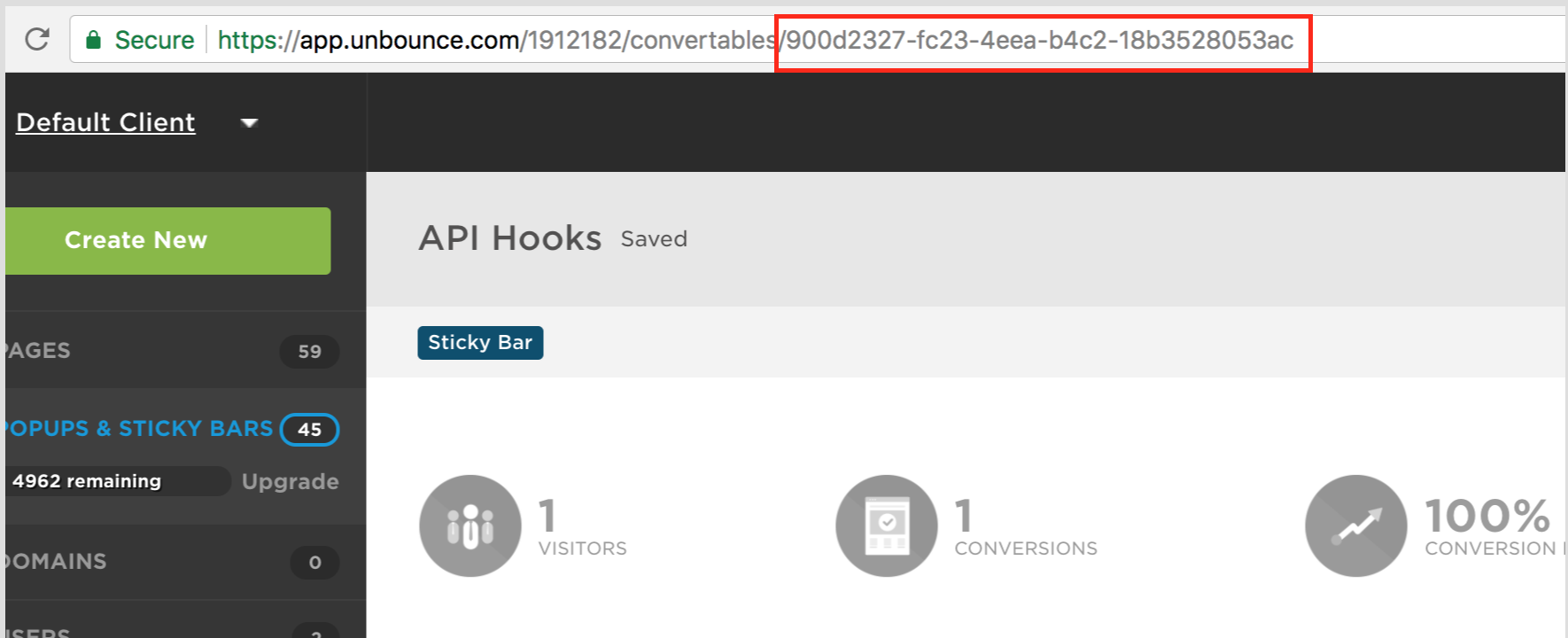
Each hook needs the ID of the popup or sticky bar. You can find it in the URL of the overview screen for that popup or sticky bar.
Step 2. Choose a hook
In each snippet below, replace 900d2327-fc23-4eea-b4c2-18b3528053ac with the ID from step 1.
onShow
Runs when the popup or sticky bar appears on the page.
<script>
     window._ubeConfig = window._ubeConfig || {};
     window._ubeConfig.onShow = function(id) {
       // Replace with the ID you found in step 1
       if (id === '900d2327-fc23-4eea-b4c2-18b3528053ac') {
         // Custom code to run
       }
    };
    </script>
onDismiss
Runs when a visitor dismisses the popup or sticky bar.
<script>
 window._ubeConfig = window._ubeConfig || {};
 window._ubeConfig.onDismiss = function(id) {
   // Replace with the ID you found in step 1
   if (id === '900d2327-fc23-4eea-b4c2-18b3528053ac') {
     // Custom code to run
   }
};
</script>
onConvert
Runs when a visitor converts on the popup or sticky bar.
<script>
 window._ubeConfig = window._ubeConfig || {};
 window._ubeConfig.onConvert = function(id) {
   // Replace with the ID you found in step 1
   if (id === '900d2327-fc23-4eea-b4c2-18b3528053ac') {
     // Custom code to run
   }
};
</script>
shouldShow
Controls whether the popup or sticky bar shows at all, for example based on a URL parameter. Return false to prevent it from showing.
<script>
  window._ubeConfig = window._ubeConfig || {};
  window._ubeConfig.shouldShow = function(id) {
    // Replace with the ID you found in step 1
    if (id === '900d2327-fc23-4eea-b4c2-18b3528053ac') {
      // In here you can make the decision of whether to show or not
      return false;
    } else {
      return true;
    }
  };
</script>
Troubleshooting
If a hook doesn't behave as expected, open your browser's developer console and look for errors from the popup or sticky bar. An error in your custom code can stop the hook from running.