
A multi-step form shows one field at a time, with Next and Previous buttons to move between them. Breaking a long form into steps can make it feel shorter and easier to complete.

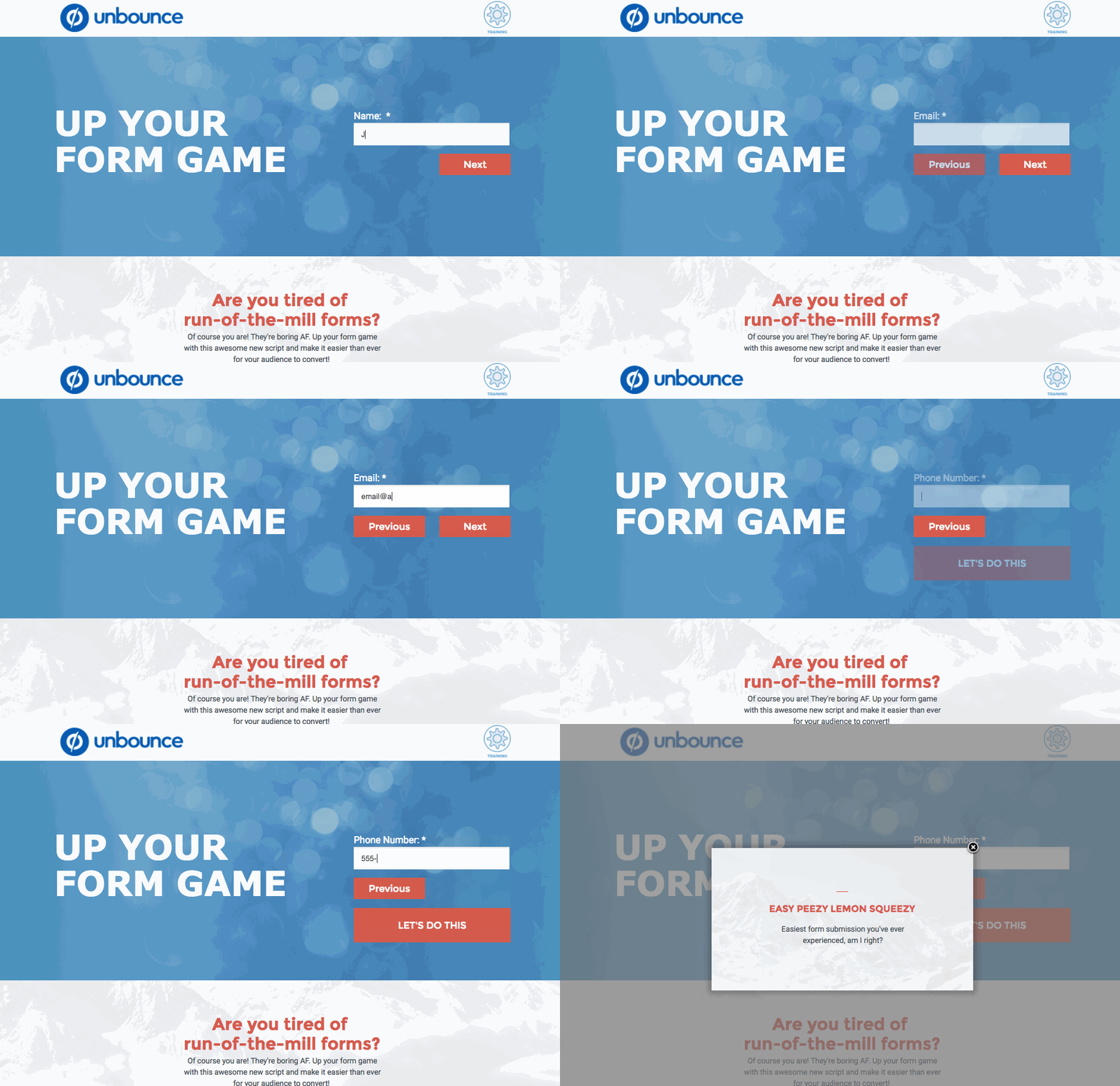
This is community code, not an official Unbounce feature. Unbounce Support can't troubleshoot custom code. Test it on a published page before relying on it, and work with a developer if you aren't comfortable editing HTML, JavaScript, and CSS.
Add the multi-step form to your page
- Create your form in the Classic Builder.
- Add two button elements, one for Next and one for Previous. Only one field shows at a time, so position these buttons and the submit button with that in mind.
- In the JavaScripts section, add the following script with placement set to Before Body End Tag:
<script type="text/javascript" src="https://cdn.jsdelivr.net/npm/progressbar.js@1.0.0/dist/progressbar.js"></script>
<script>
  (function() {
    // Update the following IDs with your own button IDs
    var backButton = document.getElementById('lp-pom-button-14');
    var nextButton = document.getElementById('lp-pom-button-13');
    var showProgressBar = false;
    var submitButton = document.querySelector('.lp-pom-form .lp-pom-button');
    var formContainer = document.querySelector('.lp-element .lp-pom-form');
    var currentField = 0;
    var allFields = document.getElementsByClassName('lp-pom-form-field');
    var errorSpan = document.createElement('span');
    for (i = 0; i < allFields.length; i++) {
      allFields[i].classList.add('hide');
      allFields[i].style.top = '0px';
    }
    backButton.classList.add('hide');
    submitButton.classList.add('hide');
    allFields[0].classList.remove('hide');
    if (allFields[0].querySelector('input')) {
      allFields[0].querySelector('input').focus();
    }
    errorSpan.classList.add('hide');
    errorSpan.style.color = 'red';
    errorSpan.style.position = 'absolute';
    var labelHeight;
    if (allFields[0].querySelector('label')) {
      labelHeight = allFields[0].querySelector('label').clientHeight;
    } else {
      labelHeight = 25;
    }
    errorSpan.style.top = '-' + labelHeight + 'px';
    formContainer.appendChild(errorSpan);
    if (showProgressBar) {
      var progressContainer = document.createElement('div');
      progressContainer.id = 'container';
      formContainer.appendChild(progressContainer);
      var bar = new ProgressBar.Line(container, {
        strokeWidth: 4,
        easing: 'easeInOut',
        duration: 1400,
        color: '#FFEA82',
        trailColor: '#eee',
        trailWidth: 1,
        svgStyle: { width: '100%', height: '100%' },
        from: { color: '#FFEA82' },
        to: { color: '#74D16A' },
        text: {
          style: {
            // Text color.
            // Default: same as stroke color (options.color)
            color: '#fff',
            position: 'absolute',
            right: '0',
            top: '30px',
            padding: 0,
            margin: 0,
            transform: null,
          },
          autoStyleContainer: false,
        },
        step: function(state, bar) {
          bar.setText(currentField + 1 + ' of ' + allFields.length);
          bar.path.setAttribute('stroke', state.color);
        },
      });
    }
    function nextEvent() {
      allFields[currentField].classList.add('hide');
      currentField += 1;
      allFields[currentField].classList.remove('hide');
      if (allFields[currentField].querySelector('input')) {
        allFields[currentField].querySelector('input').focus();
      }
      if (currentField > 0) {
        backButton.classList.remove('hide');
      }
      if (currentField === allFields.length - 1) {
        submitButton.classList.remove('hide');
        nextButton.classList.add('hide');
      }
      updateProgress();
    }
    function backEvent() {
      allFields[currentField].classList.add('hide');
      submitButton.classList.add('hide');
      currentField -= 1;
      allFields[currentField].classList.remove('hide');
      if (allFields[currentField].querySelector('input')) {
        allFields[currentField].querySelector('input').focus();
      }
      if (currentField === 0) {
        backButton.classList.add('hide');
        nextButton.classList.remove('hide');
      }
      if (currentField <= allFields.length - 1) {
        nextButton.classList.remove('hide');
      }
      updateProgress();
    }
    function currentFieldInvalid() {
      var invalidInput = allFields[currentField].querySelector(':invalid');
      if (invalidInput) {
        errorSpan.textContent = invalidInput.validationMessage;
      }
      return Boolean(invalidInput);
    }
    function updateProgress() {
      if (showProgressBar) {
        var barSize = (currentField + 1) / allFields.length;
        bar.animate(barSize); // Number from 0.0 to 1.0
      }
    }
    updateProgress();
    nextButton.addEventListener('click', function(e) {
      if (currentFieldInvalid()) {
        if (allFields[currentField].querySelector('input')) {
          allFields[currentField].querySelector('input').classList.add('hasError');
        } else {
          allFields[currentField].children[1].classList.add('hasError');
        }
        errorSpan.classList.remove('hide');
        e.preventDefault();
      } else {
        if (allFields[currentField].querySelector('input')) {
          allFields[currentField].querySelector('input').classList.remove('hasError');
        } else {
          allFields[currentField].children[1].classList.remove('hasError');
        }
        errorSpan.classList.add('hide');
        nextEvent();
      }
    });
    backButton.addEventListener('click', backEvent);
    submitButton.addEventListener('click', function(e) {
      if (currentFieldInvalid()) {
        if (allFields[currentField].querySelector('input')) {
          allFields[currentField].querySelector('input').classList.add('hasError');
        } else {
          allFields[currentField].children[1].classList.add('hasError');
        }
        errorSpan.classList.remove('hide');
        e.preventDefault();
      } else {
        if (allFields[currentField].querySelector('input')) {
          allFields[currentField].querySelector('input').classList.remove('hasError');
        } else {
          allFields[currentField].children[1].classList.remove('hasError');
        }
        errorSpan.classList.add('hide');
      }
    });
    document.body.addEventListener('keydown', function(e) {
      var keyCode = e.keyCode || e.which;
      // Enter key
      if (keyCode === 13 && currentField < allFields.length - 1) {
        if (currentFieldInvalid()) {
          if (allFields[currentField].querySelector('input')) {
            allFields[currentField].querySelector('input').classList.add('hasError');
          } else {
            allFields[currentField].children[1].classList.add('hasError');
          }
          errorSpan.classList.remove('hide');
          e.preventDefault();
        } else {
          if (allFields[currentField].querySelector('input')) {
            allFields[currentField].querySelector('input').classList.remove('hasError');
          } else {
            allFields[currentField].children[1].classList.remove('hasError');
          }
          errorSpan.classList.add('hide');
          e.preventDefault();
          nextEvent();
        }
      } else if (keyCode === 13 && currentField === allFields.length - 1) {
        if (currentFieldInvalid()) {
          if (allFields[currentField].querySelector('input')) {
            allFields[currentField].querySelector('input').classList.add('hasError');
          } else {
            allFields[currentField].children[1].classList.add('hasError');
          }
          errorSpan.classList.remove('hide');
          e.preventDefault();
        } else {
          if (allFields[currentField].querySelector('input')) {
            allFields[currentField].querySelector('input').classList.remove('hasError');
          } else {
            allFields[currentField].children[1].classList.remove('hasError');
          }
          errorSpan.classList.add('hide');
        }
      }
      if (keyCode === 37) {
        // Left key
        if (currentField > 0) {
          backEvent();
        }
      } else if (keyCode === 39) {
        // Right key
        if (currentField < allFields.length - 1) {
          if (currentFieldInvalid()) {
            if (allFields[currentField].querySelector('input')) {
              allFields[currentField].querySelector('input').classList.add('hasError');
            } else {
              allFields[currentField].children[1].classList.add('hasError');
            }
            errorSpan.classList.remove('hide');
            e.preventDefault();
          } else {
            if (allFields[currentField].querySelector('input')) {
              allFields[currentField].querySelector('input').classList.remove('hasError');
            } else {
              allFields[currentField].children[1].classList.remove('hasError');
            }
            errorSpan.classList.add('hide');
            nextEvent();
          }
        }
      }
    });
  })();
  /**
   * Do not remove this section; it allows our team to troubleshoot and track feature adoption.
   * TS:0002-03-062
   */
</script>- In the script, replace the button IDs with the IDs of your Previous and Next buttons. Leave out the
#. - Add the following CSS to the Stylesheets section:
<style>
  #container {
    margin-top: -45px;
    width: 100%;
    height: 8px;
    position: relative;
  }
  .lp-form-errors {
    display: none !important;
  }
  .hasError {
    border: 1px solid tomato !important;
    box-shadow: 0px 0px 5px 1px tomato !important;
  }
  .hide {
    display: none !important;
  }
  .lp-pom-form-field,
  .lp-pom-button {
    -webkit-animation: KEYFRAME-NAME 2s;
    -moz-animation: KEYFRAME-NAME 2s;
    -o-animation: KEYFRAME-NAME 2s;
    animation: KEYFRAME-NAME 2s;
  }
  @-webkit-keyframes KEYFRAME-NAME {
    0% {
      opacity: 0;
    }
    100% {
      opacity: 1;
    }
  }
  @-moz-keyframes KEYFRAME-NAME {
    0% {
      opacity: 0;
    }
    100% {
      opacity: 1;
    }
  }
  @-o-keyframes KEYFRAME-NAME {
    0% {
      opacity: 0;
    }
    100% {
      opacity: 1;
    }
  }
  @keyframes KEYFRAME-NAME {
    0% {
      opacity: 0;
    }
    100% {
      opacity: 1;
    }
  }
</style>- Save and republish the page.
Test the change
Run an A/B test with a small share of traffic to compare the multi-step form against your original form.